Monitoring
From ignored spreadsheet emails to monitoring that works while you sleep.
(paste image URL in src above)
Cypris is an AI-powered R&D intelligence platform used by innovation and IP teams at global manufacturers. Monitoring, the recurring intelligence customers set up on patents, papers, and competitors, was the product's most frequent touchpoint and its most ignored. Over fourteen months I led it through two full generations: a ground-up rebuild that replaced Excel attachments with AI-summarized in-platform reports, and then Agentic Monitoring, which turns those reports into an autonomous intelligence layer.
Three generations of the same promise: never miss what matters.
v0 · Legacy–2025
The spreadsheet email
Scheduled emails with an .xlsx attached, sent whether or not anything changed, with links that broke on arrival. Customers learned to ignore the sender.
v1 · RebuildSep 2025
AI-summarized reports
One setup grammar across four monitor types, six new patent alert categories, newsletter-style emails, and an in-platform report that replaced the attachment entirely.
v2 · AgenticJun 2026
Autonomous intelligence
Define a domain once in natural language; agents monitor patents, papers, compounds, regulatory filings, and M&A continuously, acting while users are off-platform.
v2 · Agentic Monitoring, live in product · click the cards to switch generations
The feature designed to bring customers back was teaching them to look away.
The data lived in an attachment
Every monitoring email carried an Excel file. Users had to download it, open it, and comb through hundreds of rows to spot anything new, an ask most simply stopped making.
The emails cried wolf
Reports went out on schedule regardless of whether anything changed. Identical datasets arrived week after week, and customers mentally filtered the sender out of their inbox.
Trust broke at the seams
Links redirected to the dashboard instead of the cited patent or paper, and update data wasn't always current. Once a research tool sends you to the wrong document, every future claim is suspect.
A feature nobody could find or finish
Monitoring lived only on the dashboard, setup was confusing enough that account managers configured monitors on customers' behalf, and few knew external colleagues could receive reports at all.
Every account call surfaced the same three complaints.
Links in the monitoring email redirect to the dashboard instead of the intended article or patent, and the same patents keep reappearing week after week.
The attachment-first emails are plain, text-heavy, and hard to scan. Downloading and combing a spreadsheet is an extra step nobody has time for.
Duplicate emails with the same content arrive every week. I only want to see new patents, not the ones I've already reviewed.
Paraphrased from account-management feedback sessions I audited before writing the PRD. Because there's no PM on the team, grounding every proposed feature in a named customer complaint was also my scoping tool. When engineering bandwidth tightened, we cut by severity of evidence, not by opinion.
Three rules, written before a single screen.
Only interrupt with news
An alert product's currency is attention. If nothing changed, nothing sends. If something changed, the delta leads the message, not the full dataset.
Meet users where the search happens
Monitoring shouldn't be a destination you remember to visit. It should be one click from any search result, saved search, or company page you're already on.
Analysis over rows
Users don't want 400 rows; they want what the 400 rows mean. AI summaries interpret the update, with the raw, filterable evidence exactly one layer beneath.
(paste gif URLs into data-gif on the three cards above)
One setup grammar across four monitor types, and a report that made the spreadsheet obsolete.
A single side-panel flow that flexes across keywords, patents, papers, and organizations
The legacy setup was a different, half-documented path per data type. I redesigned it as one consistent grammar: choose what to track → configure updates → add recipients → preview and schedule. It pulls from saved searches and flagged collections so users never re-enter work they've already done. The Monitor button now lives on every search results page and carries the current query and applied filters into setup.
Trade-off · Five entry points to keep consistent. The shared panel pattern kept that cost contained, and each entry point is instrumented separately so we know which ones earn their placement.
full setup flow
(paste URL in src)
Full flow · Configuring a keyword monitor
full setup flow
(paste URL in src)
Full flow · Configuring a paper monitor
full setup flow
(paste URL in src)
Full flow · Configuring an organization monitor
Six new patent alert categories, written as consequences instead of database fields
Patent data is jargon-dense, so every alert type is captioned with what it means for the user's coverage ("we'll alert you when patents approach their projected legal expiration dates"), and status changes render as explicit transitions like Pending → Discontinued on report cards. Forward-citation alerts let companies watch competitors cite their own patents: an early-warning signal customers had been assembling by hand.
Trade-off · Longer setup screens. Worth it: this is low-frequency, high-stakes configuration where comprehension beats compactness.
full setup flow
(paste URL in src)
Full flow · Configuring a patent monitor
Recipients with smart suggestions, and a live preview before anything sends
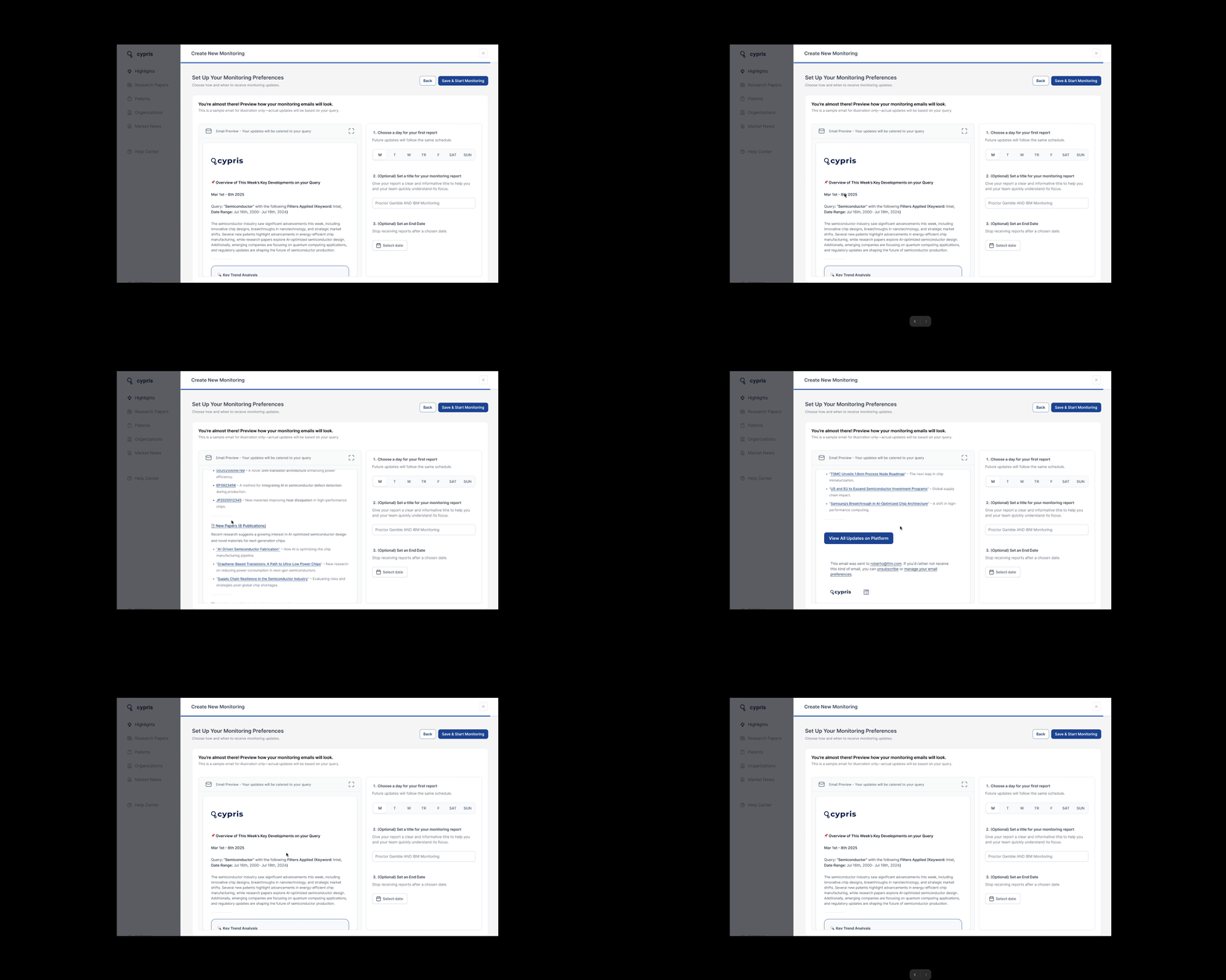
Recipient selection suggests teammates, frequent contacts, and project collaborators, and states plainly that non-Cypris users can receive reports, a capability customers didn't know existed. The final step pairs scheduling with a live preview of the exact email that will arrive, a direct answer to the trust deficit.
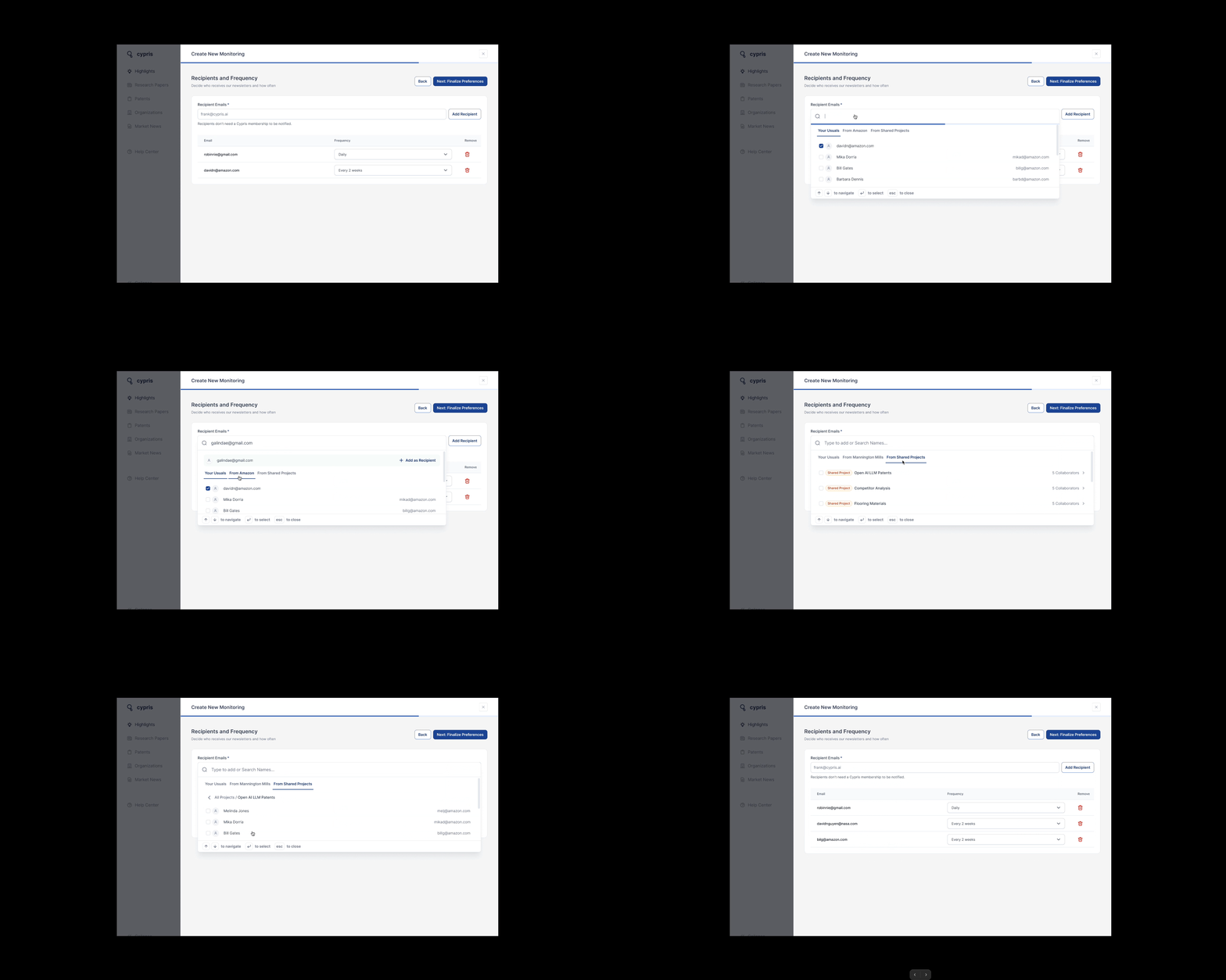
Recipients · usuals, teammates, project collaborators, external emails
The in-platform report: from attachment to destination
An AI-generated narrative leads; beneath it, updates are organized into the same categories chosen at setup, each filterable and sortable, with items flaggable straight into collections. Every report saves automatically, building a historical log teams scroll back through. The left navigation mirrors the setup taxonomy, so the mental model formed while configuring a monitor is the same one used to read it.
Trade-off · An LLM summary over an empty result set produces confident nonsense. We caught this in UAT and suppressed summaries on empty reports in the first iteration release.
monitoring report
(paste URL in src)
A real keyword monitoring report
monitoring report
(paste URL in src)
Viewing a live report · organization monitoring
Emails became a newsletter people actually open
Each email leads with an AI summary of what changed, one spotlighted trend, and a single CTA into the full report. Author lists are capped, large numbers are formatted, and dead-end unsubscribe links gave way to managing monitors in-product.
Emails sent via monitoring
A control layer the legacy system never had
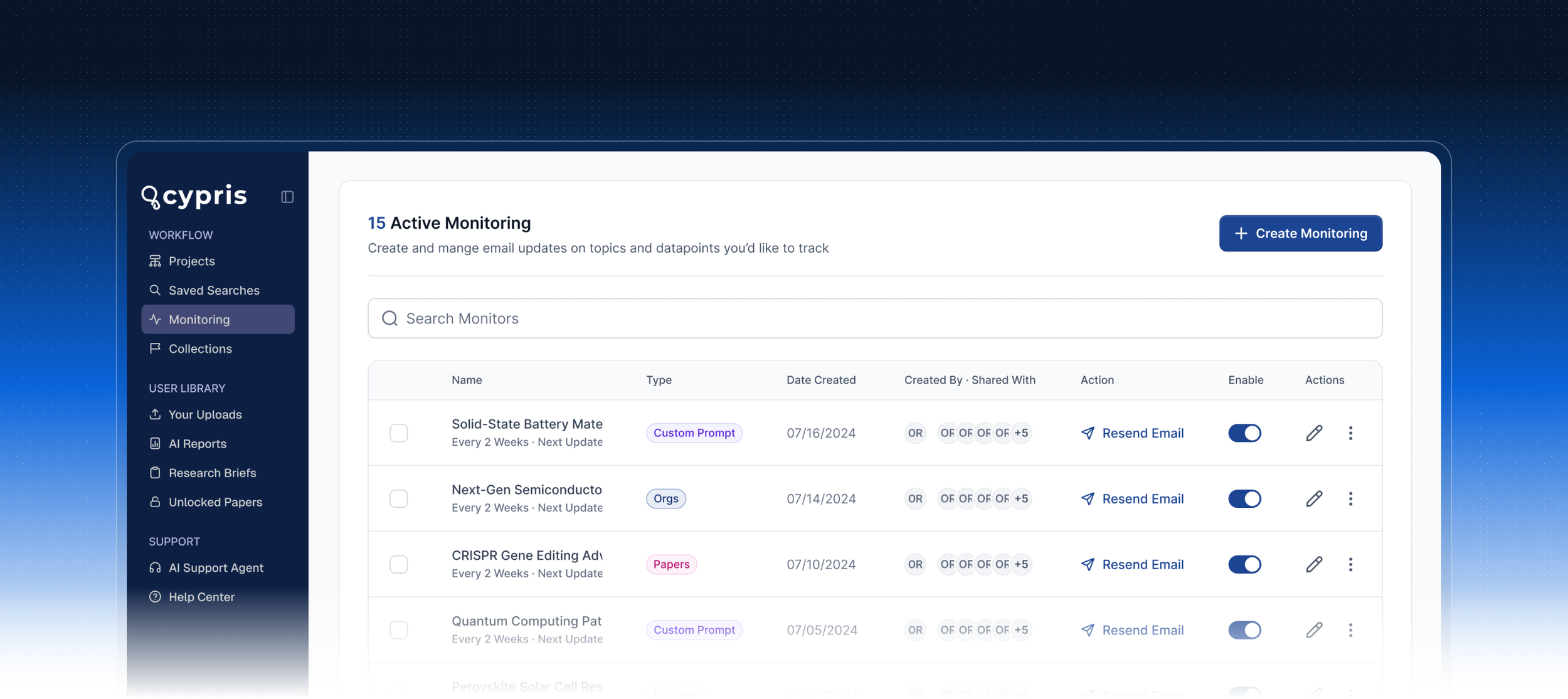
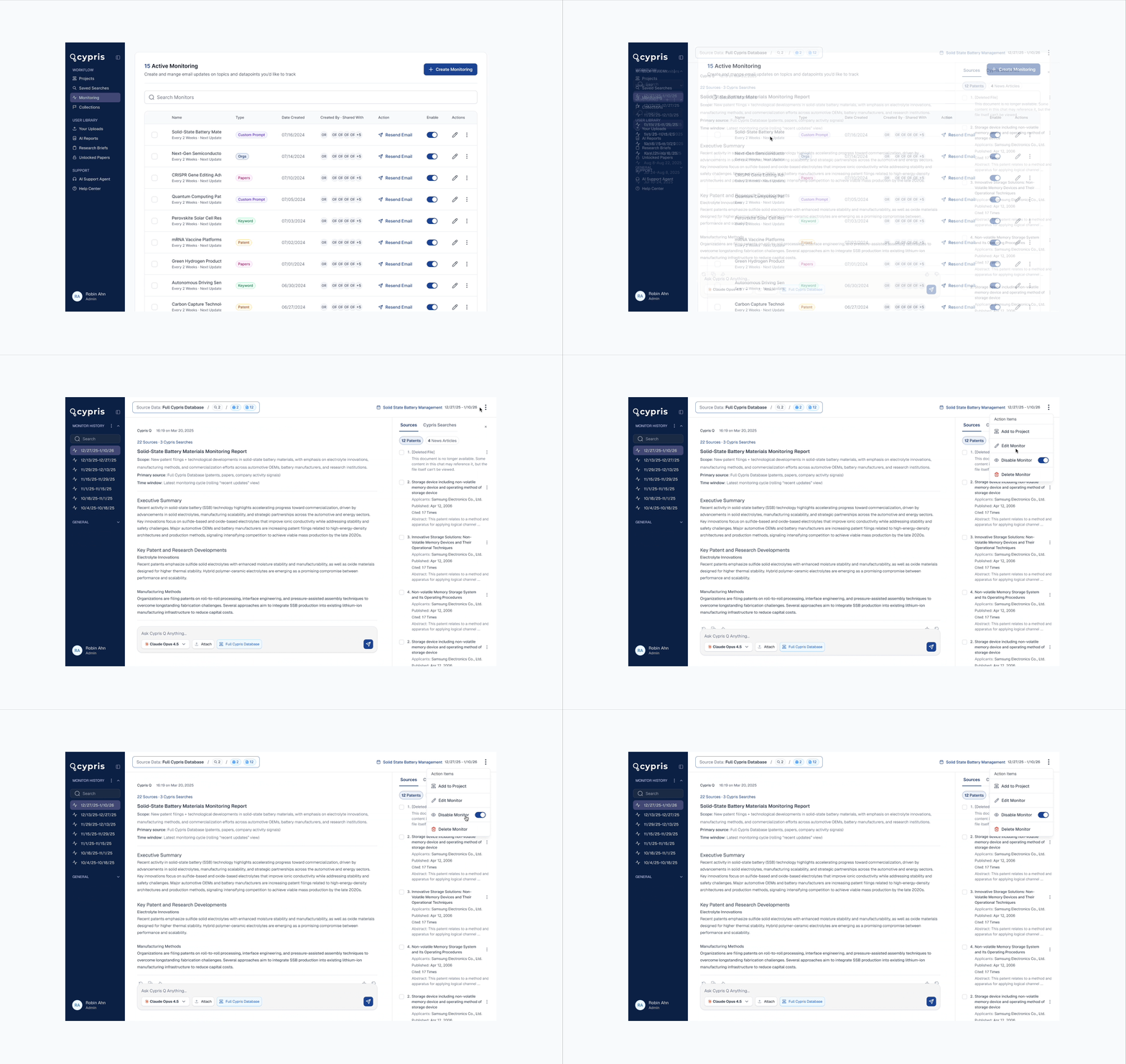
Monitoring home puts every active monitor in one table, enable/disable toggles, cadence configuration, resend, sharing, and the single highest-leverage control in the whole project: a "send only if new results exist" toggle. It rewrites the contract with the user: an email from Monitoring now means something happened.
Trade-off · Fewer touchpoints and lower raw email volume, a metric some teams optimize for. I argued signal quality compounds into retention; leadership agreed.
configuring cadence, and the
"only when new updates" toggle
(paste URL in src)
Enabling & disabling monitors · cadence · send-only-when-new
Plumbing before paint: a three-phase rollout, shipped on plan.
The legacy system's accuracy problems meant a beautiful UI on unreliable data would burn the one relaunch we'd get, so data reliability and observability landed before anything users could see. I stayed inside the build loop throughout: running design QA in UAT alongside engineering and maintaining the shared triage tracker.
Apr 2025
PRD & prototypes
I wrote the evidence-anchored PRD and built clickable Figma prototypes for all four monitor types and every entry point.
May 2025 · Phase 1
Plumbing
New monitoring database, endpoints, and observability, so we'd know something broke before customers did.
Jun 2025 · Phase 2
Creation flows
The new setup experience across all four types, the search-page Monitor button, and filter-aware saved searches.
Jul–Aug 2025 · Phase 3
The report page
Flagged in planning as the riskiest surface, so it got the longest QA runway.
Sep 17, 2025
UAT & bug bash
25+ bugs and polish tasks (broken share states, stale org data, filter failures, copy fixes) logged, owned, and resolved before GA.
Sep 25, 2025
GA: live for all users
Announced publicly and shipped across the platform.
Oct 17, 2025
Iteration 1
Duplicate-monitor prevention, document-status icons on report cards, AI summaries suppressed on empty reports, saved-search monitor editing fixed.
Oct 2025 – Apr 2026
Customer research → v2 concept
Session write-ups across six industries turned into the design brief for what came next.
Jun 1, 2026
Agentic Monitoring launches
The rebuild's infrastructure becomes the foundation for an autonomous intelligence layer.
Post-launch research became the brief for the next product.
After GA I sat in on customer sessions across textiles, currency security, food & beverage, tire manufacturing, packaging, and pharma, writing each one up with a proposed design response. The pattern: the rebuild fixed delivery; the next frontier was meaning.
I proposed natural-language monitor setup in my session write-up, describe the goal, let the system configure keywords and tailor the report. This became the founding interaction of Agentic Monitoring.
Delta-first intelligence: agentic reports lead with what changed since the last cycle instead of re-describing the space.
Reworked the section around the NEW-patents / NEW-papers grammar customers already used, and validated the language in follow-up sessions.
Worked with engineering on summary prompt revisions toward a warmer register, and treated cross-checking as intended behavior, keeping filterable evidence one click beneath every claim.
Deep-linking from email cards to the opened document, logged with engineering straight from the session write-up.
Inline citations in report summaries: every claim traceable to the patent or paper behind it.
The rebuild taught customers to trust the reports. The current generation removes the last manual steps: writing the query, and asking the follow-ups.
v1 fixed the pipeline: monitors people could configure, reports people could read, emails people actually opened. The work since then, shipped across the first half of 2026, changes what a monitor is. Instead of a static report on a schedule, a monitor is becoming a standing conversation with Cypris’s agents: configured in plain language, delivered in a chattable, cited format, and derived from the same prompts teams already run every day.
Cypris Q Monitoring: configure a monitor the way you’d brief a colleague
Setting up a monitor used to mean building a boolean or semantic search, or uploading a hand-picked set of patents or organizations to watch. Cypris Q Monitoring replaces all of that with a single natural-language prompt: describe what you want to stay on top of, and Q translates it into the monitor’s scope. The people who most need monitoring are R&D leads, not search specialists. They no longer have to speak the database’s language to get coverage.
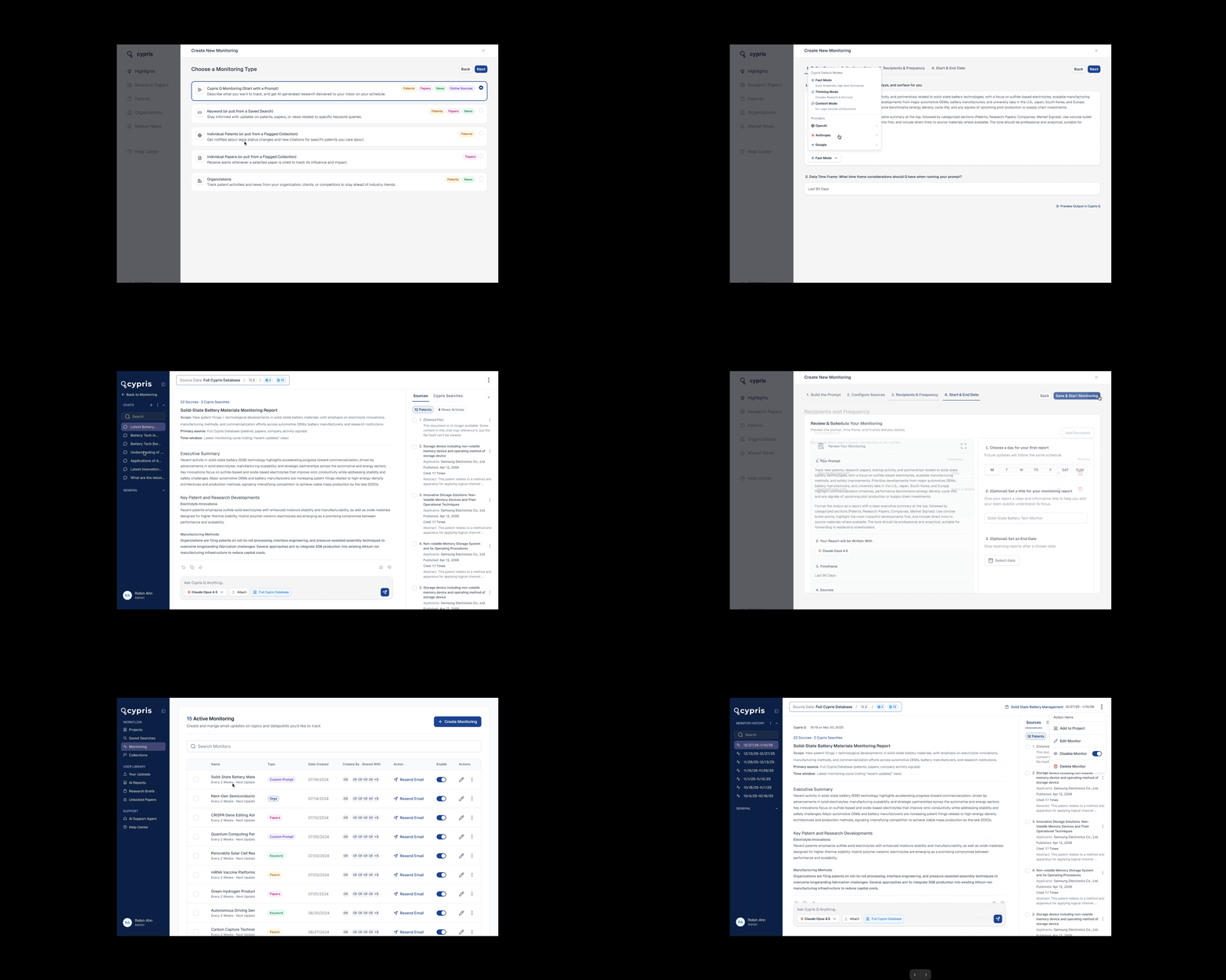
Cypris Q Monitoring · define the scope in natural language, no query syntax
Agentic Monitoring: every report is a conversation with its sources attached
Research kept surfacing the same behavior: users read the monitoring report, then combed through the sources manually anyway, and many pasted the whole report into Cypris Q, our research chatbot, just to verify its accuracy. They didn’t distrust the data; they distrusted any summary they couldn’t interrogate. So we combined the two products. Agentic Monitoring delivers each run in Q format instead of a static output: an initial report the user can chat with, where every follow-up answer comes back cited. It also dissolves a whole category of busywork: nobody has to flag sources into a collection anymore, because every cited source already lives in the chat session. Each monitor persists as a grouped thread: open it from the dashboard and you get the initial report plus every conversation you’ve had with it, in one place.
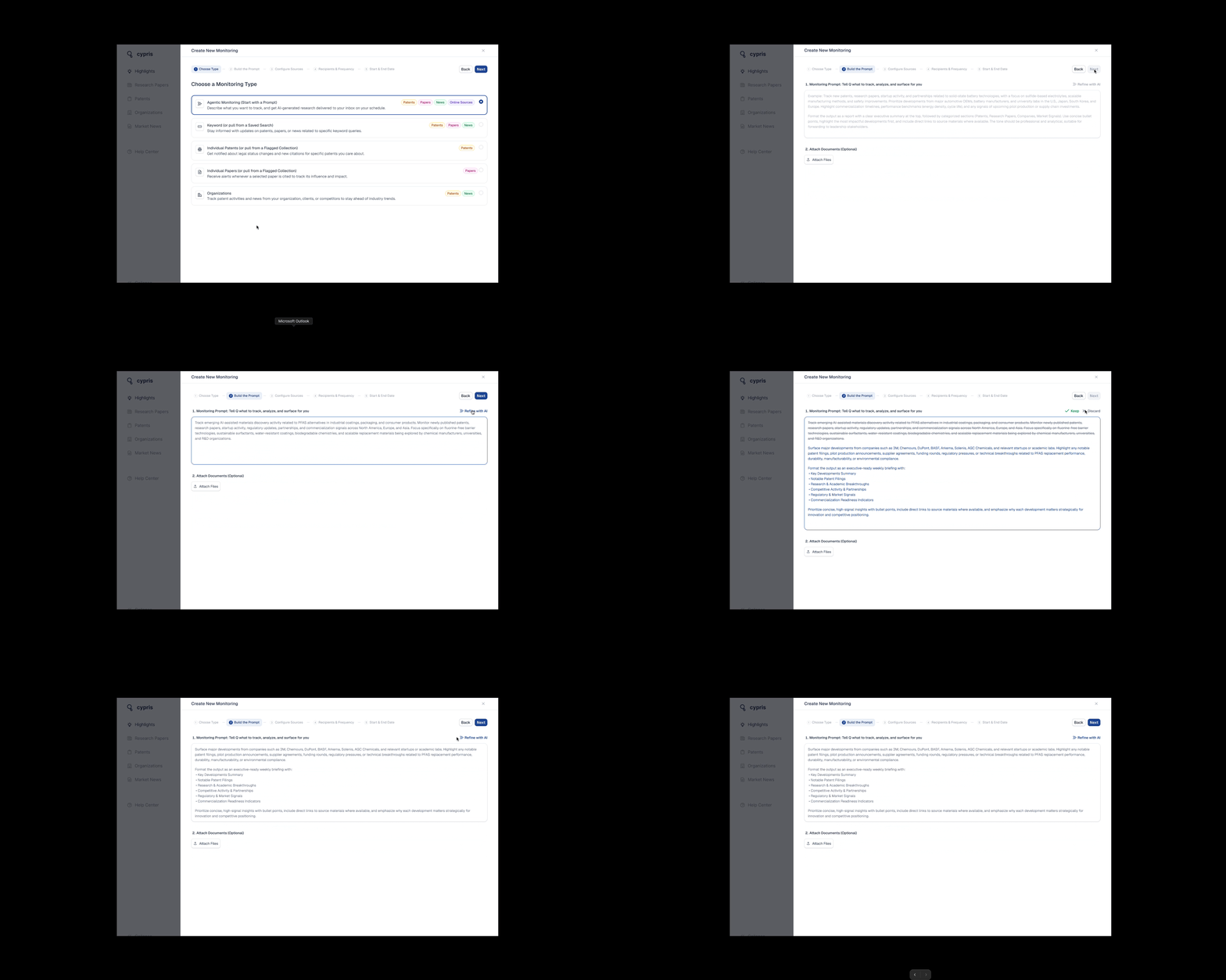
Agentic Monitoring · a chattable, cited report instead of a static output
Agent Library in Monitoring: monitors that derive from the prompts teams already run
Agents launched in Q1 2026 with three tiers: a personal library for the prompts you run most, a team library for the ones your team shares, and Cypris-provided agents covering common R&D use cases. Agent Library in Monitoring closes the loop by letting any of those prompts drive a monitor directly. It centralizes the agents feature instead of forking it, since a monitor derives from the agent rather than duplicating its prompt. It also keeps scope honest: edit the agent, and the linked monitor’s coverage adjusts naturally with it.
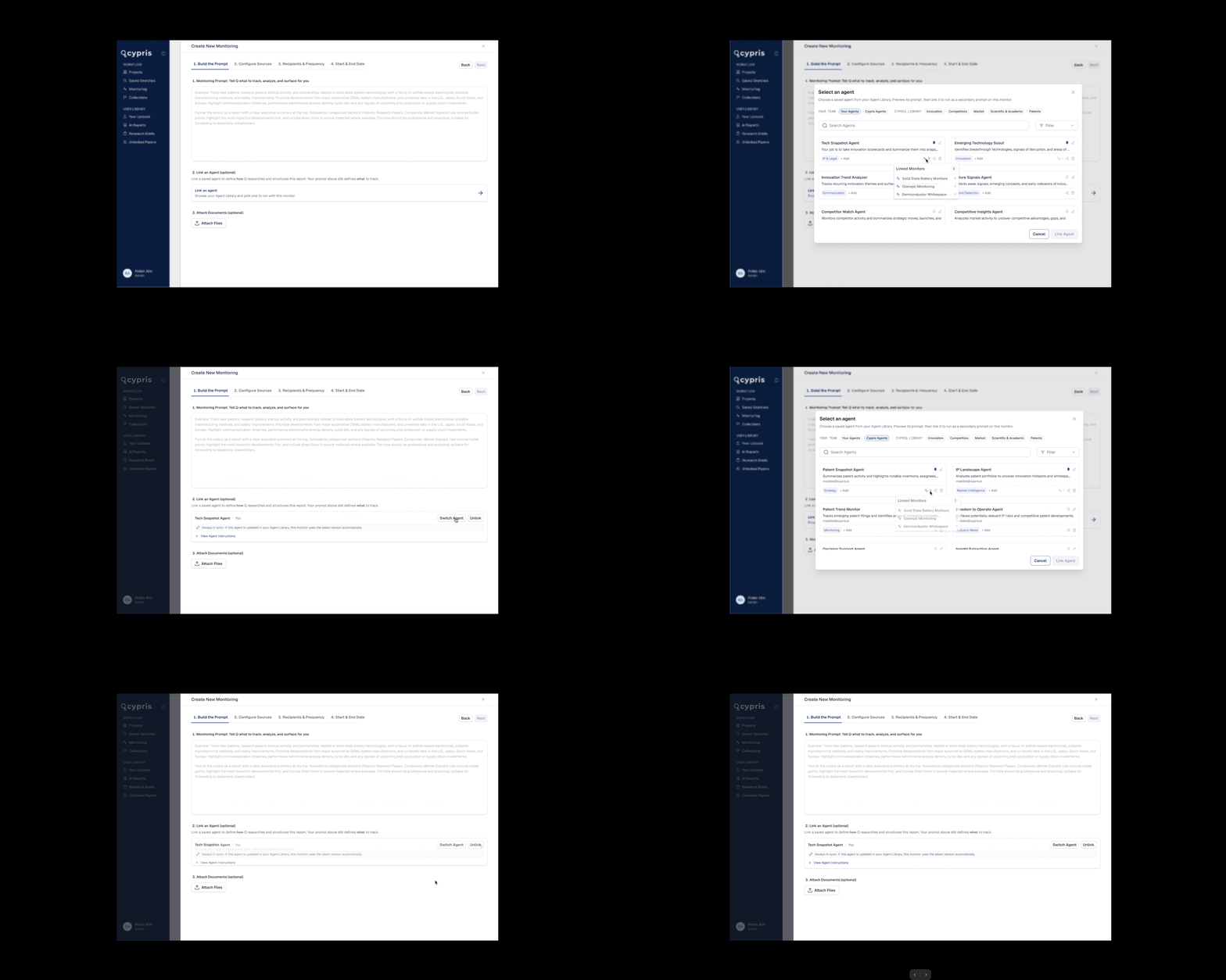
Agent Library · run a saved, shared, or Cypris-provided agent as a monitor
Instrumented from day one. I defined the Mixpanel event plan alongside the designs.
0
Of users who entered the keyword monitoring flow completed a monitor: 46 of 46 in the first tracking window
0
Keyword monitors created in the first six months of instrumentation (Jul–Dec 2025)
0
Actively refined data types and searched mid-setup rather than accepting defaults
0
Expanded into organization monitoring after creating their first keyword monitor
0
Returned post-creation to edit monitors, open advanced search, or prompt Cypris Q from monitoring flows, high-intent, workflow-embedded behavior
0
Post-creation drop-off. The design goal, not a failure: monitoring runs in the background so users don't have to
Source: Mixpanel flow analysis, Jul 2 – Dec 29, 2025. Users transitioned between Monitoring, Search, and Cypris Q within the same sessions, evidence the feature is embedded in real workflows rather than trialed and abandoned.
The launch, in public.
Field notes for the next build.
No PM turned out to be the best constraint I never asked for.
Every feature had to trace back to a named customer complaint I could read out loud in a scope debate. Arguments got shorter, the roadmap got sharper, and when bandwidth tightened we cut by severity of pain instead of by whoever argued loudest.
Ship the plumbing like it's the product. It is.
The prettiest email template dies on a broken link. Sequencing data reliability before anything visible, and staying in bug triage through UAT, is why launch week brought polish requests instead of trust incidents.
AI moved the question from "what do we show" to "what do we claim."
The sharpest post-launch feedback was about sameness, voice, and receipts, not layout. Designing the delta logic and the evidence trail became the heart of v2, and the sessions that surfaced it became the brief for Agentic Monitoring.